

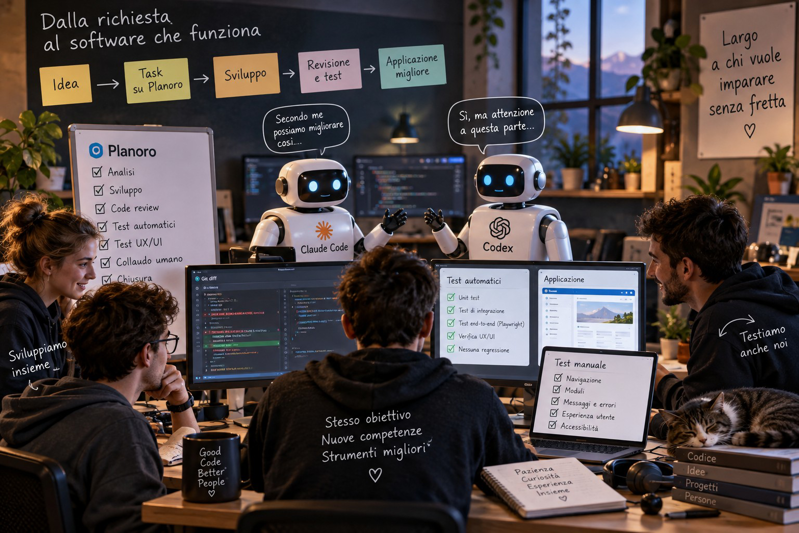
Our team
For some time now we have been working together on several software projects, pooling our skills, our experience and above all our desire to experiment. The group includes people who have been programming for many years and others who have only just started: junior developers who are still building their skills and who take an active part in developing our applications.
Over the past year we have integrated Claude Code and Codex CLI into our work, to the point of automating parts of the analysis, implementation, review and testing activities. Today an agent can examine an entire repository, identify a problem, propose a solution and implement it in a timeframe that until recently would have seemed unlikely. By using multiple agents at the same time, work can also move forward on different parts of the same project.
In this context, we chose to keep programming together, leaving room for those who are learning as well. Junior developers write code, build features, deal with errors and take part in technical decisions, using AI tools but not abusing them.
This choice has very concrete consequences for how we organize our work. When a feature could be developed entirely by an agent, we can still decide to tackle it ourselves, perhaps getting help with the analysis or the review. Those who are learning must be able to experiment, make mistakes, fix them and, above all, understand the solutions they build. If we systematically handed every programming task to the agents, we would end up eliminating the very opportunities through which people become more skilled developers.
This doesn't mean giving up speed or using artificial intelligence only for marginal tasks. The agents really do develop, modify code and run tests. Simply, when distributing the work, we also take into account the skills we want to acquire, not just which tool could complete a given task first.
Working this way, we also started to face an organizational problem: how do we coordinate people and agents working on the same projects, how do we keep track of decisions, and how do we let Claude Code and Codex compare notes without constantly losing context?
One of the answers was to build Planoro together, our project management software. It grew out of the needs we encountered while developing our own projects and keeps evolving as we use it. Through MCP we integrated it into the agents' workflow, creating a shared reference for tasks, information and work progress.
From there the method I describe in this article took shape: an environment in which Claude Code and Codex analyze and review each other's solutions, Planoro helps us organize the work, and all of us continue to take part in development, each with our own experience and something new to learn.
How we organized the workflow
The first step was to prepare a development environment that could be understood and used by both people and agents. So we started working on the repository's shared instructions, the MCP connections, the description of tasks in Planoro, and a review process that would let us verify the proposals from Claude Code and Codex before merging them into the project.
The resulting workflow is not rigid: we adapt it to the complexity of the work, to whoever decides to take it on, and to the skills we want to deepen. Some tasks are developed directly by the agents, others by us, and others through joint work. However, information and checks must remain accessible, so that whoever picks up a feature can understand what was done, why, and with what results.
So we will start with the configuration of the tools, and arrive at a complete example of development, agent comparison and testing.
Preparing a project that multiple agents can understand
The first problem we faced was context. Claude Code and Codex can work on the same repository, but each keeps its own session and its own information. The fact that both see the same files doesn't mean they know about the decisions made during a previous conversation.
For this reason we try to keep in the project the information that needs to outlive individual sessions. Git remains the reference for the code and its evolution, while a few Markdown files describe the architecture, the conventions and the decisions that would be tedious to explain again every time.
A project can have a structure like this:
progetto/
├── AGENTS.md
├── CLAUDE.md
├── README.md
├── docs/
│   ├── ARCHITECTURE.md
│   ├── DECISIONS.md
│   └── TESTING.md
├── src/
└── tests/
AGENTS.md is the instruction file recognized by Codex, while CLAUDE.md is used by Claude Code. In the latter we can reference the shared rules, avoiding the need to maintain two different copies. The other documents are not required by either tool, but they become useful as the project grows and especially when several people and agents have to pick up work started by others.
An example of the rules I would put in the project is the following:
# Istruzioni di progetto

Prima di proporre modifiche, analizza
l'implementazione esistente.

Rispetta l'architettura e le convenzioni
del repository.

Non modificare file durante una fase
di sola analisi.

Quando proponi una soluzione, indica
anche le alternative considerate.

Per ogni modifica esegui i test pertinenti
e distingui quelli superati da quelli
non eseguiti.

Non effettuare commit, push o deploy
senza una richiesta esplicita.

Documenta le decisioni tecniche che
potrebbero influenzare attività future.

Quando revisioni il lavoro di un altro
agente, verifica il codice e le evidenze
senza considerare corretta una soluzione
solo perché è già stata proposta.
The quality of the instructions has a considerable impact on the agents' behavior. A huge file full of redundant rules can be less useful than a few precise guidelines. So we try to keep these instructions close to how the application actually works, updating them when the project's conventions change.
Connecting Planoro to Claude Code and Codex through MCP
Planoro was also born from the need to make it easier to coordinate work that now involves numerous AI sessions. When a change is discussed in Claude, verified with Codex and later picked up by one of us, it becomes important to be able to retrieve the original task, understand which decisions were made, and tell what is still to be done apart from what has already been verified.
The Model Context Protocol makes it possible to give agents access to external tools through a standardized interface. In our case, the connection involves Planoro and the operations that its MCP server exposes.
To show how the configuration works, let's assume that the Planoro instance provides an HTTP MCP endpoint. The following commands are examples to be adapted to the address and authentication of your own installation.
With Claude Code we can register the server in the project:
claude mcp add --transport http \
  --scope project \
  planoro <URL_MCP_PLANORO>
With Codex CLI the equivalent configuration is:
codex mcp add planoro \
  --url <URL_MCP_PLANORO>
Once the connection is configured, we can check that it is in place:
claude mcp list
codex mcp list
In Claude Code we also use /mcp to check the connection and any authentication. Credentials must be handled through the mechanisms provided by the clients and the server, avoiding putting them in the repository's documents.
At this point we can ask the agents to retrieve the context of the tasks through the tools provided by Planoro. It's important to be clear that the MCP connection, by itself, does not create an automatic conversation between Claude and Codex. It does, however, allow them to use a common system to read and, where supported, update information. The sequence in which the two agents must compare notes remains part of our operating workflow.
The difference compared to simply using the terminal is significant. A session doesn't necessarily have to start with a manual explanation of the problem: it can start from a task that is already described, with the references needed to find your way around the repository.
From the Planoro task to the comparison between Claude and Codex
Let's take a practical case. In an ASP.NET Core MVC application, a problem emerges in booking management: under certain conditions, two simultaneous requests can take the same availability.
The problem is described in Planoro, along with the expected behavior and the conditions that will let us verify the fix. We try to write tasks so that they can be understood even by someone who didn't follow the initial discussion.
For this task, the required outcome will be to prevent duplicate bookings, without introducing regressions in the other booking flows. We don't define right away how to solve it, because that is exactly what we want to use the technical comparison for.
I start with Claude Code, asking for an assessment without authorizing any changes:
Retrieve from Planoro the task about duplicate bookings and analyze the code involved. Reconstruct how it currently works, identify the possible causes and propose a solution. Do not modify any files. Also describe the alternatives, the risks and the necessary checks, separating what you observed in the code from the hypotheses that still need to be proven.
Once I have the proposal, I move on to Codex. I prefer that at this stage it develops its own analysis, without immediately receiving Claude's conclusions. This way we can compare two evaluation paths rather than merely getting a confirmation of the first answer.
Independently analyze the problem described in the Planoro task. Examine the repository and propose a technical solution, pointing out any race conditions, data integrity problems and possible regressions. Do not modify the code and do not assume that a correct solution already exists.
Suppose Claude suggests checking availability before saving, and Codex proposes also adding a protection at the database level. At this point we can start the cross-review.
Information can be passed along through the artifacts associated with the task, if the relevant operations are available in Planoro's MCP server, or through shared documents in the repository. In the latter case we can use, for example, a docs/reviews/ directory with one document per analysis. The requirement is that each agent can read the other's proposal without losing the references to the original problem.
The review prompt we use as a template is this:
Examine the solution proposed by the other agent, comparing it with the existing code and with the task requirements. Identify any errors, conditions not considered or technically better alternatives. For each observation, provide a verifiable rationale. If you agree with a choice, explain why; if you don't, indicate what evidence could help decide.
This approach allows us to use Claude and Codex as mutual reviewers. It doesn't matter that they always come up with a different solution: if they independently reach the same conclusions and can justify them, the comparison still has value.
How we handle the comparison when the solutions differ
The most delicate part is knowing when to continue the comparison and when to move on to practical verification. Two agents can produce convincing arguments without either of them truly demonstrating that the solution is correct.
To avoid wasting time on repetitive discussions, I prefer to limit the comparison to a first round of analysis, a cross-review and, when useful, a reply on the technical issues that are still open.
We can use an instruction like this:
Reconsider your proposal in light of the feedback you received. Accept the corrections supported by the code or by technical evidence, explain any remaining disagreements and identify a test capable of settling them. Do not repeat arguments that have already been examined and do not look for a merely formal agreement. Conclude with an updated proposal and with the issues that still require verification.
In our example, the test could consist of sending two simultaneous booking requests for the same resource and checking the system's behavior. It is far more useful to observe how transactions and database constraints are handled than to keep debating in the abstract which approach is preferable.
When the comparison concerns an architectural decision, we also discuss it among ourselves. The agents' proposals remain technical material to be examined, and decisions are recorded in the project's context so that we can retrieve them during later work.
How we divide the work without leaving everything to the agents
Once the solution is clear, the task can be broken down into smaller pieces of work. For booking management, for example, we can separate the changes to the application logic, error handling, any work on the database and the preparation of tests.
These tasks remain visible in Planoro and we can decide together which ones to tackle ourselves and which to hand over to the agents. Someone with less experience can take care of part of the implementation, perhaps working with Claude Code open next to the editor to understand a class, or with Codex to review the code they have just written.
I don't think it's particularly useful to ask someone to manually write every single line when we have tools that can help us. At the same time, if an agent systematically completes all the features before those who are learning have had a chance to tackle them, we end up taking away space from precisely the experiences that allow people to grow.
For this reason we try to distribute the work also based on what we want to learn. Sometimes the agent prepares a first implementation that we then examine and modify; other times we write the code ourselves and ask Codex or Claude to look for problems. In still other cases we work together on the same solution, discussing alternatives as we develop.
One aspect I consider important is being able to explain the changes made. If a component was generated by AI, whoever integrates it should still understand how it works, know which dependencies it introduces, and be able to step in when something goes wrong.
Avoiding interference when we work in parallel
Being able to work simultaneously requires a few precautions. If two agents modify the same files in the same directory, the risk of overwriting changes or mixing up the project's states is real.
When tasks need to proceed in parallel, we can use separate Git branches and, if necessary, separate working trees.
For example, starting from the main repository:
git worktree add \
  -b task/prenotazioni-claude \
  ../progetto-claude HEAD

git worktree add \
  -b task/prenotazioni-codex \
  ../progetto-codex HEAD
This way each agent has its own working directory and the changes can be compared afterward through Git. The same mechanism is useful when one of us is programming a feature and an agent has to carry out a different change.
It isn't necessary to create a worktree for every analysis. If we are only examining the code without modifying it, the same repository may be enough. Separation becomes particularly useful when concurrent changes are being made.
The integration moment remains important: changes must be re-examined, compared and verified before being merged into the shared branch.
Code review and the way we test
Over time we have started to use agents for testing as well, combining code review, automated functional and UX/UI tests, and checks carried out directly by us.
One method we use is to have one agent examine the other's work, or to have Codex verify a feature developed by hand. The review starts from the Git diffs and continues with the relevant tests, without automatically considering a task complete just because the build succeeded.
A review request might be:
Examine the changes related to the Planoro task and compare them with the acceptance criteria. Run the available functional tests and verify the main user flows through the browser, including navigation, forms, responsive behavior and UX/UI aspects. Identify any regressions and document the anomalies, distinguishing confirmed problems from risks that still need to be verified.
For web applications we also use browser automation tools, to simulate user actions, verify the behavior of the interfaces and repeat the tests after every significant change.
Alongside automation we keep human testing, in which all of us take part. Using the application directly lets us spot navigation difficulties, unintuitive choices and user experience problems that automated checks might miss. The anomalies we find can become new automated tests, progressively improving the process.
The results of the checks are linked back to the Planoro tasks, while Git preserves the history of the changes. This way we keep track not only of the code developed, but also of the checks carried out before considering a piece of work complete.
Planoro also grew with this method
An interesting part of this experience is that Planoro itself was developed through the shared work that it now helps us organize.
Building a tool that we use every day lets us recognize the limits of our workflow fairly quickly. When a step requires too many manual operations, or when a certain piece of information keeps getting lost when switching sessions, we can think about how to improve the system.
Not every problem calls for a new feature. Sometimes it's enough to change the way we describe a task, improve the agents' instructions, or avoid duplicating information that is already in the repository.
Here too, Claude Code and Codex can contribute in different ways: one analyzes a possible change, the other verifies its implications, while we try out the result and keep improving it. The advantage of working on a tool we know so well is being able to immediately compare the AI's proposals with the needs we run into during development.
The part I don't want to fully automate
With this workflow we could probably push even further on automation. We could have the agents analyze a larger number of tasks, let them implement entire features, and step in only during the final review.
In many cases it would be faster, at least in the short term. But we work together also because we enjoy programming, experimenting and learning new things, and not all of us necessarily have the same level of experience.
When a person runs into a difficulty that an agent could solve in a few seconds, I don't automatically consider that time lost. Understanding an error, following a call through several layers of the application, or discovering why a seemingly correct solution doesn't work are experiences that help build competence.
Artificial intelligence learned from an enormous body of knowledge produced by people. Tomorrow's models won't automatically learn from every line we write today, but they will still need new knowledge, solved problems, verification and critical thinking. If we stopped creating opportunities for new developers to gain experience, we would risk impoverishing the very human expertise that allows us to use and improve these tools.
For now, our method continues to evolve along with our projects. Claude Code, Codex and Planoro allow us to work in a more organized way and to experiment with solutions that a few years ago would have been far more demanding. We want to take advantage of this opportunity without turning every task into a race to see who finishes first.
Patience, even in software development, remains a virtue. And making room for those who want to learn, without rushing, is a good way not to forget it.